
 Website Development
Project overview
GOSMART is a native Android educational gaming application developed for Egomerit LLC to make knowledge testing more engaging through interactive, game-based learning. The application brings together six distinct game categories within a single mobile experience, combining educational questions, visual challenges, and immediate feedback in an environment designed to encourage curiosity and participation.
At the heart of GOSMART is a straightforward idea: learning and entertainment do not need to compete. By presenting educational activities as games, the application gives users different ways to challenge their knowledge, practise familiar concepts, and explore new questions without the experience feeling like a conventional classroom assessment.
The application features six learning experiences: Math Game, Trivia Game, Guessing Game, Vocabulary Game, Number Quiz, and Picture Game. Each category introduces a different style of interaction, allowing the product to cover a wider range of knowledge and reasoning activities than a single-format quiz application.
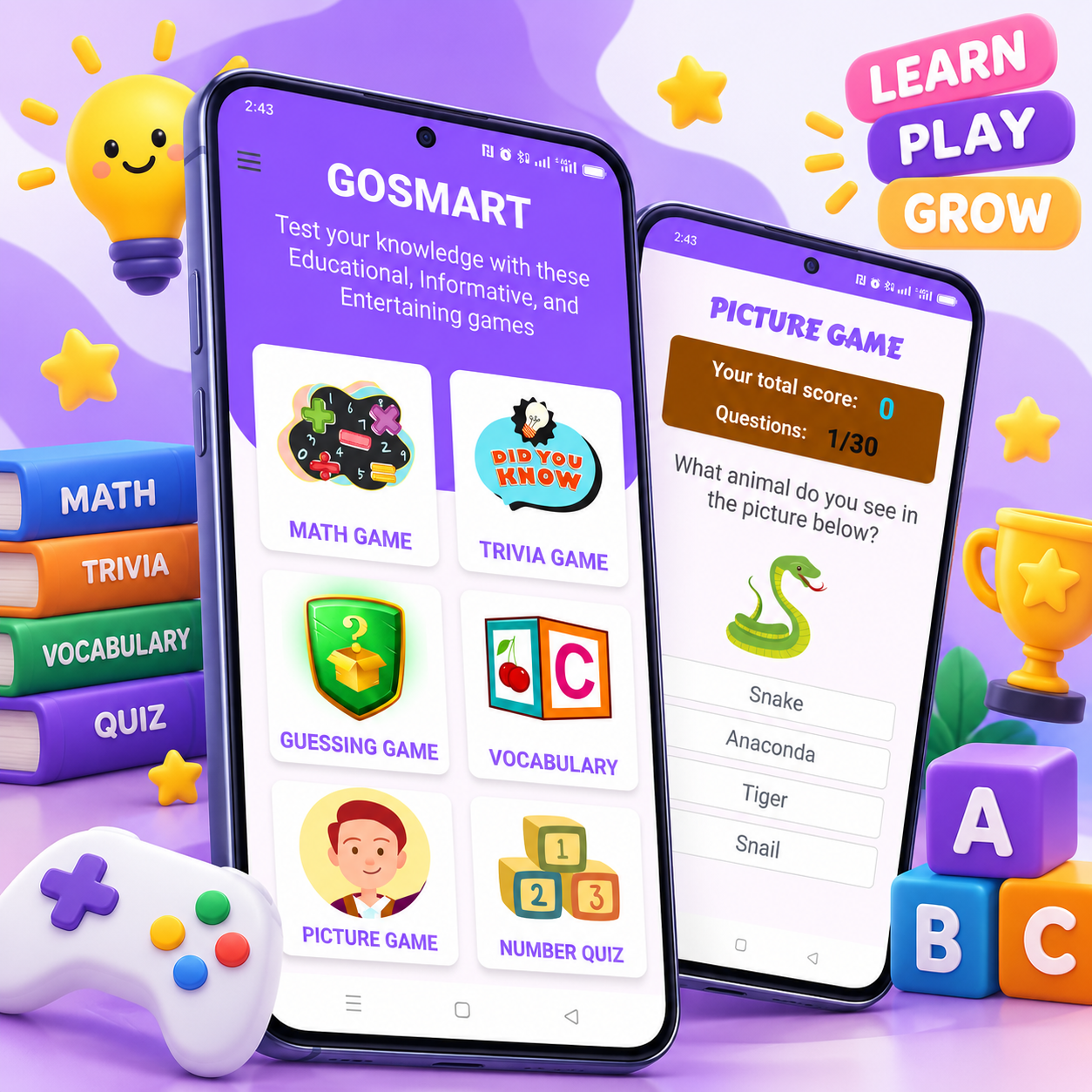
GOSMART's interface places these experiences within a recognizable, easy-to-navigate home screen. A vibrant purple visual identity, illustrated game cards, clear category names, and touch-friendly layouts give the application a playful character while making its main features immediately accessible.
The learning experience extends beyond selecting answers. The Picture Game, for example, presents illustrated questions with multiple-choice responses and visible score and question-progress information. The results interface provides a summary of correct and incorrect answers, followed by a correction review that allows users to compare their responses with the expected answers. This gives the application an important educational dimension: users can review mistakes rather than simply finish a game and receive a score.
From a development perspective, GOSMART was implemented as a native Android application using Kotlin, AndroidX/AppCompat, Material components, and XML-based layouts. The project also incorporates supporting libraries for image presentation and PDF document generation, reflecting the technical requirements of a mobile product that combines interactive content with additional application capabilities.
For Godwin Elijah, GOSMART demonstrates the development of a mobile application in which visual design, interactive game flows, answer evaluation, and platform-specific Android engineering work together to create a coherent educational product. It is an example of software built not merely to display information, but to actively engage users through structured experiences.
Project challenge, solution & result
Creating GOSMART required bringing several different educational game formats together without making the application difficult to navigate or inconsistent to use. Each game category has its own learning purpose, but the overall experience needed to feel like one connected product. The development challenge involved balancing educational content with engaging interaction, presenting questions clearly on mobile screens, maintaining understandable scoring and progress indicators, and giving users meaningful feedback after completing an activity. The solution was a native Android application built around a colorful game-selection interface, focused question screens, and a results experience that makes answer review part of the learning process. GOSMART combines six game categories within a consistent mobile environment, supported by Android-specific development technologies and a distinctive educational identity.
Educational applications face a particular design challenge: they must make learning approachable without reducing it to decoration or repetitive interaction. A successful quiz experience needs to capture attention, communicate questions clearly, provide suitable answer choices, and help users understand their performance.
For GOSMART, this challenge was made more substantial by the decision to bring six different educational game types into one application. Mathematics, general knowledge, guessing, vocabulary, number-based activities, and picture recognition do not all rely on the same kind of thinking. The application therefore needed a structure that could accommodate different learning experiences while preserving a recognizable interface.
Another important consideration was mobile usability. Educational content must remain readable on a relatively small screen, and interactive elements need enough visual separation to prevent confusion. Questions, illustrations, answer options, score information, and progress indicators all compete for space, particularly when the application presents visual questions alongside multiple possible answers.
Scoring and feedback also required careful attention. Showing users whether they have answered correctly is useful, but it is not the same as helping them learn. A more meaningful experience needs to make mistakes understandable, allowing users to review their selections and see the correct responses.
The technical challenge was to bring these interactions into a native Android application with consistent navigation, dependable screen behavior, appropriate handling of visual assets, and a project structure that supports the different game experiences.
The objective was not simply to create six buttons leading to six activities. It was to establish a cohesive educational gaming product where the individual games, question flows, and results screens all contribute to the same learning-oriented experience.
Combining Multiple Learning Experiences
The application needed to accommodate six distinct game categories, each with a different educational emphasis. The challenge was to make these experiences accessible through one clear navigation structure without losing the identity or purpose of each game.
Designing Questions for Mobile Interaction
Questions, illustrations, answer choices, scores, and progress indicators must remain understandable on compact Android screens. The interface needed to give each element sufficient prominence while keeping the interaction straightforward and comfortable for touch-based use.
Making Feedback Educational
A quiz score provides a measure of performance, but it does not explain what the user got wrong. GOSMART needed a results experience that could distinguish correct and incorrect responses and present answer corrections in a form users could review after completing a game.
Maintaining a Consistent Native Android Experience
Bringing multiple game flows into one application required consistent visual components, screen layouts, and navigation patterns. The technical implementation also needed to support illustrated content, interactive controls, and the Android platform requirements of the project.
GOSMART was developed as a native Android application with a central home screen that introduces all six educational game categories. Rather than placing users inside a single quiz format, the application presents a selection of activities and allows them to choose the type of challenge they want to explore.
The home screen uses a two-column grid of illustrated cards for Math Game, Trivia Game, Guessing Game, Vocabulary Game, Picture Game, and Number Quiz. Each card combines a recognizable image with a prominent title, making the categories easy to distinguish. The purple header and consistent visual styling establish a playful identity that carries through the application.
Within the game experience, the interface shifts its focus from discovery to participation. The Picture Game demonstrates this approach through a dedicated question screen with a clear heading, visible score information, question progress, an illustration, and multiple-choice answer buttons. The screen is structured so that users can understand what they are being asked and where to interact without unnecessary visual distractions.
The application also incorporates a results and correction experience. At the end of a quiz, users can see the total number of questions, how many answers were correct, and how many were incorrect. A correction section then presents questions alongside submitted answers and the expected responses, using visual distinctions to make the review easier to follow.
This approach gives the application a more complete learning flow: choose an activity, answer questions, review performance, and examine mistakes. The correction interface is particularly valuable because it turns the end of a game into an opportunity for reflection rather than treating the final score as the only outcome.
On the technical side, GOSMART was built using Kotlin and AndroidX/AppCompat, with Material components and XML layouts forming the basis of its Android interface. Gradle Kotlin DSL manages the build configuration, while Glide is included for image and GIF handling. The project also includes iText 7 for PDF certificate generation functionality.
The implementation targets Android API level 34, compiles against API level 36, and supports devices from API level 24 onward. These choices form part of the application's native Android development foundation.
Throughout the project, the emphasis remained on connecting the technical implementation to the intended user experience. Illustrated activities, clearly presented questions, straightforward answer selection, and structured feedback all serve the same purpose: making educational practice interactive, understandable, and enjoyable.
Six Educational Games in One Application
GOSMART brings Math Game, Trivia Game, Guessing Game, Vocabulary Game, Number Quiz, and Picture Game into one Android application. A unified home screen gives each activity a clear identity while keeping the overall learning experience connected.
Interactive Question and Answer Screens
Game screens are organized around readable questions, relevant illustrations, multiple-choice answers, and visible progress information. The Picture Game demonstrates this structure through image-based questions that ask users to recognize what they see and select an answer.
Score Tracking and Answer Corrections
The quiz results interface summarizes correct and incorrect responses and provides a correction review. By presenting submitted answers alongside the expected answers, the application gives users a way to examine mistakes after completing an activity.
Playful Educational Interface Design
The application uses a distinctive purple color scheme, illustrated game cards, large headings, and touch-friendly answer controls. These elements create an approachable visual experience while keeping navigation and game interactions easy to understand.
Native Android Development with Kotlin
GOSMART was implemented using Kotlin, AndroidX/AppCompat, Material components, and XML layouts. The project uses Gradle Kotlin DSL for its build configuration and includes Glide for visual assets and iText 7 for PDF certificate generation support.
The GOSMART project resulted in a native Android educational gaming application that brings six distinct learning activities together within a recognizable and consistent mobile experience.
One of the central achievements of the project is the breadth of its game selection. Instead of limiting the experience to a single subject or question format, GOSMART provides dedicated entry points for mathematics, trivia, guessing, vocabulary, number-based questions, and picture recognition. This variety gives the application a broader educational identity and creates different opportunities for users to engage with knowledge-based activities.
The home screen establishes that identity immediately. Its illustrated game cards and vibrant purple styling create an inviting introduction to the application, while the two-column layout keeps the available activities organized and easy to explore.
The question and results interfaces demonstrate another important aspect of the finished product: the relationship between interaction and feedback. The Picture Game provides a focused environment for answering illustrated questions, while the results screen summarizes performance and presents corrections. Together, these elements create a learning experience that extends beyond simply choosing answers.
From an engineering perspective, the project represents a complete native Android application built around Kotlin and established Android UI technologies. Its implementation includes XML-based screen layouts, supporting libraries for visual content, and a configured Android build system.
GOSMART also demonstrates the importance of designing educational software around the people using it. The application uses recognizable images, prominent labels, clear answer controls, and visible progress information to make its activities understandable without sacrificing the playful character of the product.
For Godwin Elijah, GOSMART is a portfolio example of mobile application development that combines educational content, interactive gameplay, native Android implementation, and a distinctive visual identity. It reflects an approach to software development in which technical decisions and interface design work together to support a clear product purpose.
A Unified Educational Gaming Experience
GOSMART combines six educational game categories in one Android application. Its consistent home screen and visual language make the different activities feel like parts of a single product rather than unrelated games.
Learning Through Interaction
The application presents educational content through interactive questions and answer choices. Illustrated activities, such as the Picture Game, introduce visual recognition as part of the learning experience.
Meaningful Results and Review
The results interface provides a clear breakdown of correct and incorrect answers, followed by a correction review. This gives users a practical way to revisit their responses and identify mistakes after completing a quiz.
Distinctive Mobile Product Design
The purple branding, illustrated activity cards, prominent headings, and accessible visual structure establish a recognizable identity for GOSMART. The design balances playful presentation with the clarity needed for educational activities.
Native Android Engineering
The application was developed with Kotlin and the Android SDK, using AndroidX/AppCompat, Material components, XML layouts, and supporting libraries. The project demonstrates native mobile development across interface design, interactive game screens, and application configuration.
Frequently asked questions
GOSMART is a native Android educational gaming application developed for Egomerit LLC. It brings together six interactive game categories designed to help users test their knowledge through mathematics, trivia, guessing, vocabulary, numbers, and picture-based questions.
The application includes Math Game, Trivia Game, Guessing Game, Vocabulary Game, Number Quiz, and Picture Game. Each category provides a different way to engage with educational questions and knowledge-based challenges.
The quiz interface tracks scores and question progress. After a completed activity, the results screen can show the total number of questions, correct and incorrect answers, and a correction review comparing submitted responses with the expected answers.
GOSMART was developed natively for Android using Kotlin, AndroidX/AppCompat, Material components, and XML layouts. The project uses Gradle Kotlin DSL and includes Glide for image handling and iText 7 for PDF certificate generation support.
Yes. Godwin Elijah develops custom mobile applications tailored to different educational and business requirements. A similar product can be designed around specific subjects, quiz formats, interactive activities, scoring systems, learning objectives, and branding.